Your Fall Session Starts Here
IN THIS GUIDE
01
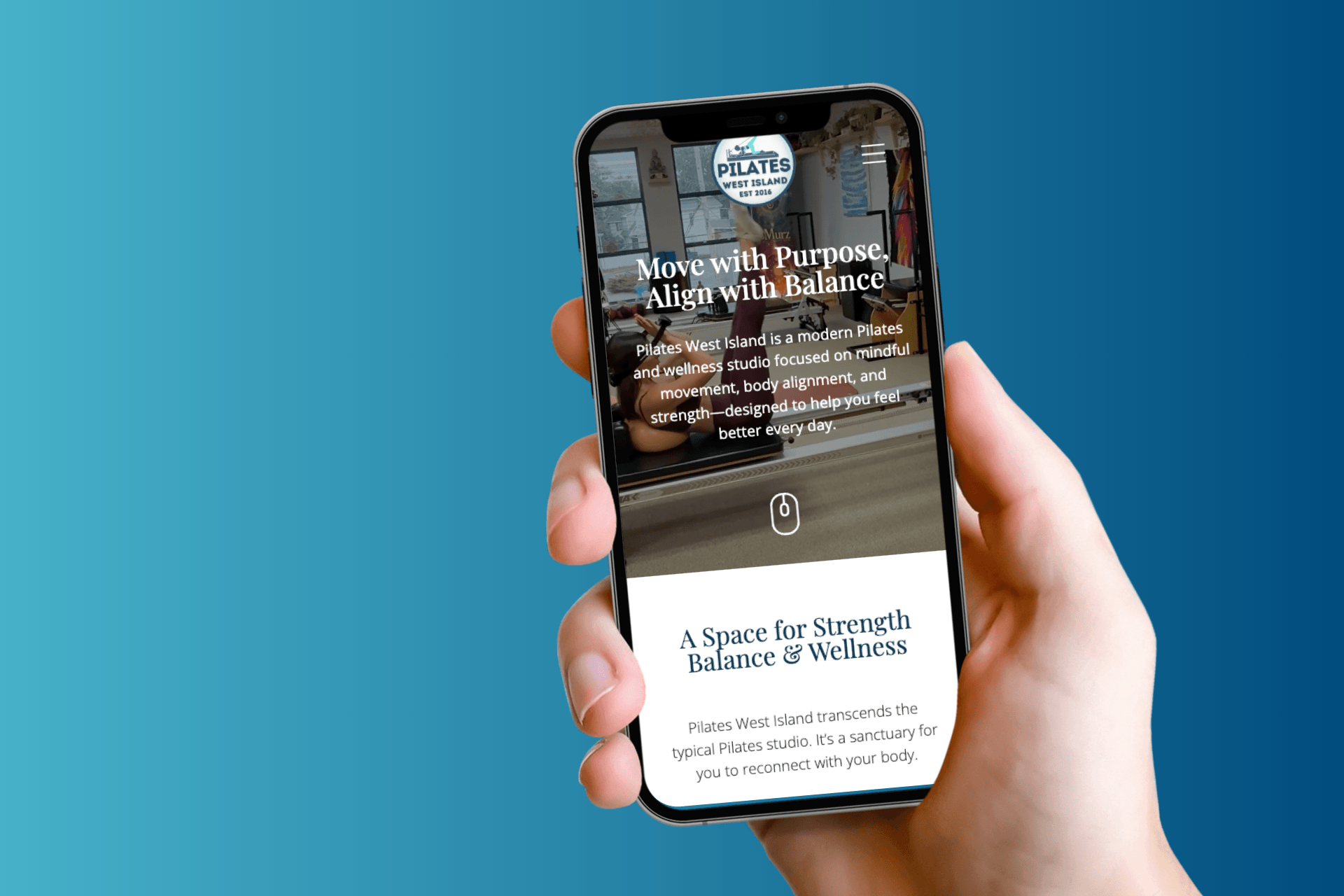
Welcome to our new digital space
02
Before you begin
03
Create your account
04
Purchase your 8-class package
05
Book your fall classes
06
Manage your account
07
A few things to know
08
If you get stuck
09
Common questions
01. Welcome to our new digital space
.A quick note before we get into the steps: we've refreshed our website, and along with it we've moved to a new online booking platform. If you've booked with us in the past, you'll notice things look different. That's on purpose. The new system gives you more flexibility, a cleaner booking experience, and a personal account area where you can manage your classes, credits, and profile in one place.
Whether you're returning to the reformer after a summer away, or starting your very first fall session with us, this guide walks you through the whole flow. You'll create your account, purchase an 8-class prepaid package, and book your fall classes, all in one sitting. Bookmark this page if you'd like to refer back to it.
02. Before you begin
Have these ready and the whole process takes under ten minutes.
Your quick checklist
- Your email address
- A credit card (or your preferred payment method)
- A quiet moment to look at your fall calendar and pick your class days
- Our current class schedule open in a second tab (optional but helpful)
Ready? Let's begin.
03.
Create your account
Your account is your home base. It's where your credits live, where your upcoming classes are listed, and where you can make changes without needing to contact us. Setting one up takes about two minutes.
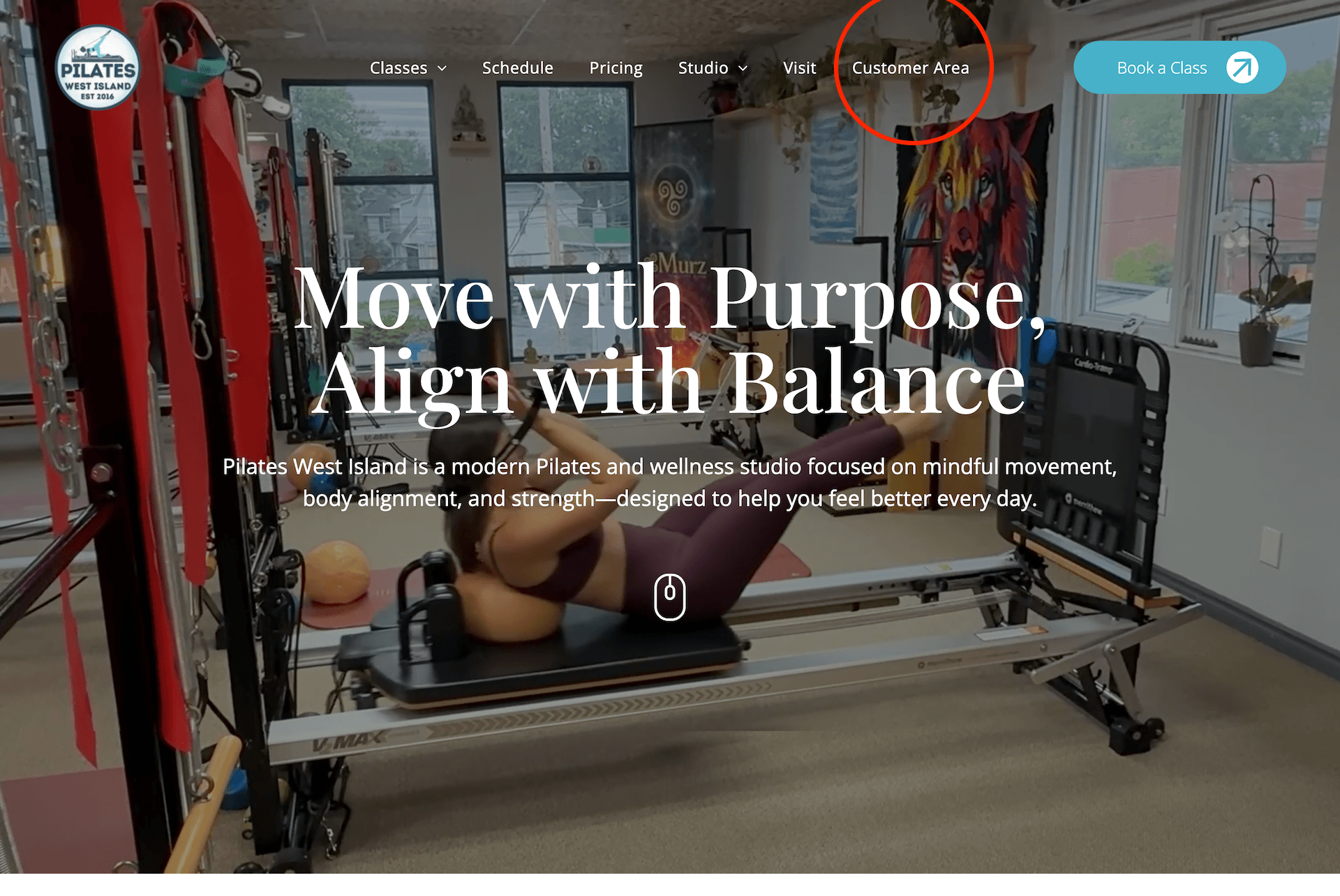
Start from our website
Head to
pilateswestisland.com and click
Customer Area in the top navigation. This opens our new customer sign-in/sign-up page.
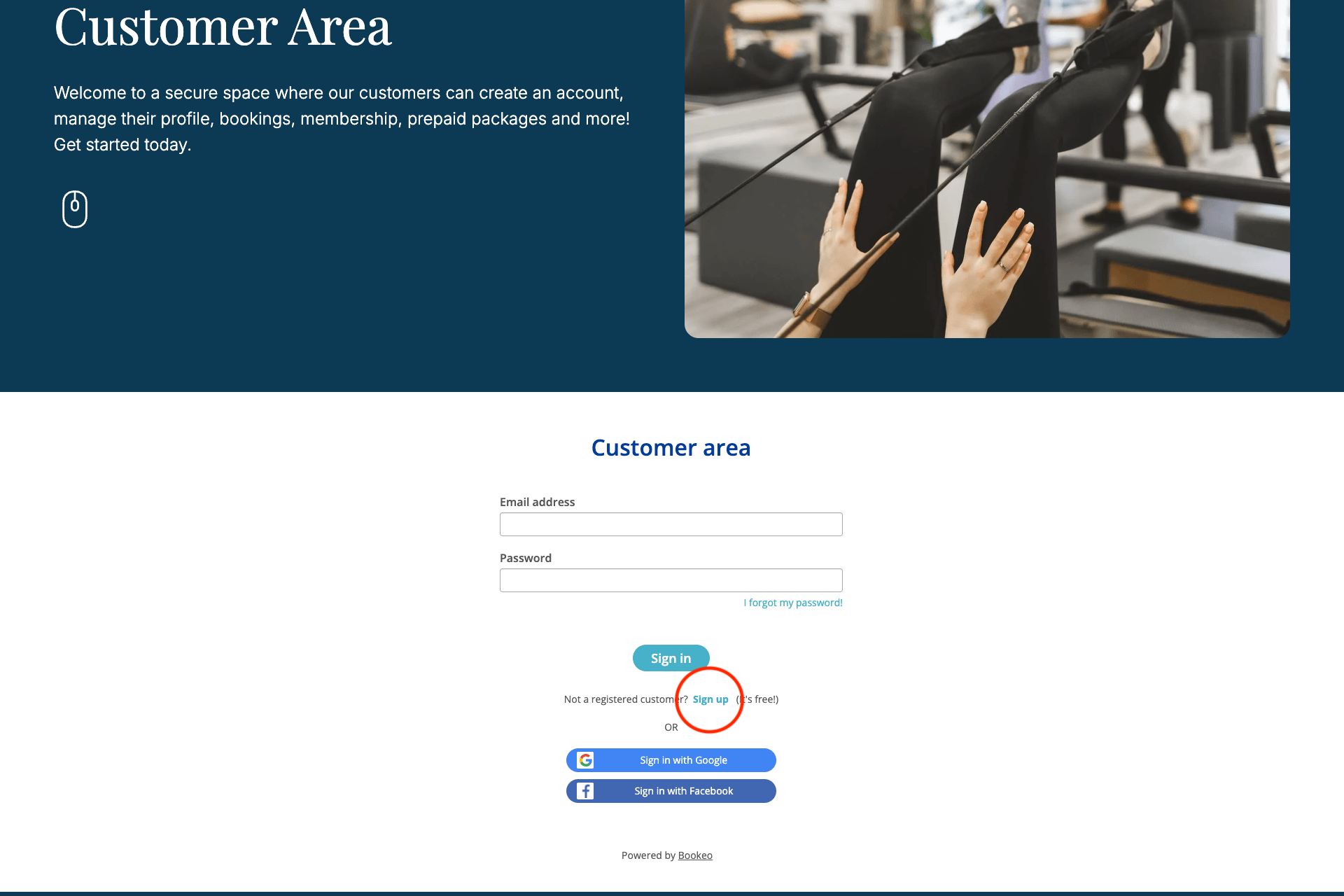
Choose "Sign up"
If this is your first time with us on the new platform, click
Sign up (or
Create an account). You'll see the hyperlink below the [Sign in] button. If you've booked with us before and aren't sure whether you already have a profile, go ahead and enter your usual email; the system will let you know if we already have you on file and will guide you through setting a password.
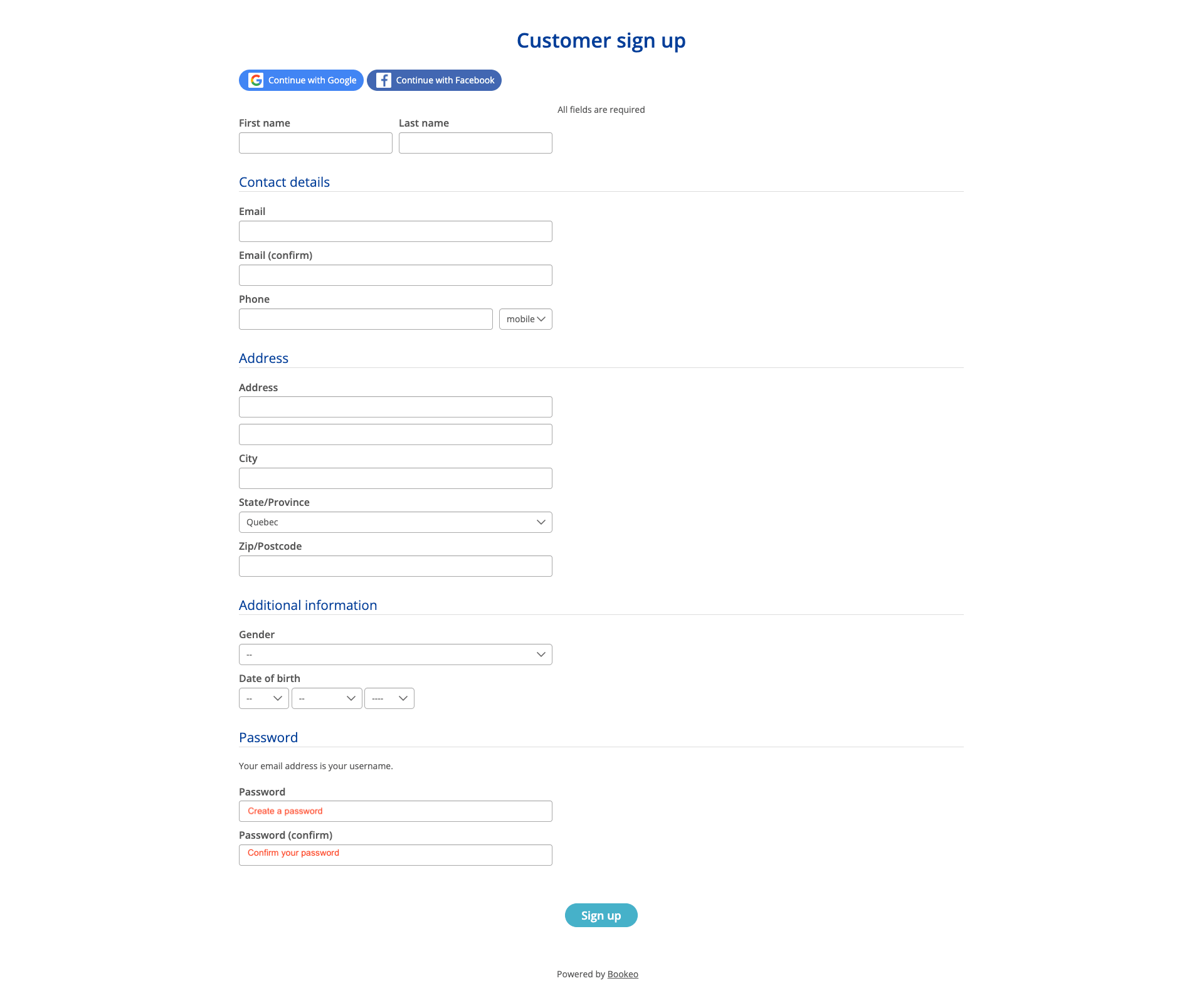
Enter your details
Fill in your first name, last name, email, and phone number. Complete your address and additional information. Choose a password you'll remember. If you'd prefer to skip creating a new password, you can sign up using your
Google or
Facebook account with one click.
Verify your email
Check your inbox for a confirmation email from Pilates West Island (it may arrive from our booking platform, Bookeo). Click the verification link to activate your account. If you don't see it within a minute or two, check your spam or promotions folder.
A TIP
Add hello@pilateswestisland.com to your contacts. That way your class confirmations, reminders, and receipts always land in your main inbox.
Welcome. You now have an account with us.
04. Purchase your 8-class package
Buying your package first (before booking individual classes) is the smoothest way to register for the fall session. Once your credits are in your account, booking each class takes only a couple of clicks, and no payment step is needed at the time of booking. Bookeo applies your credits automatically.
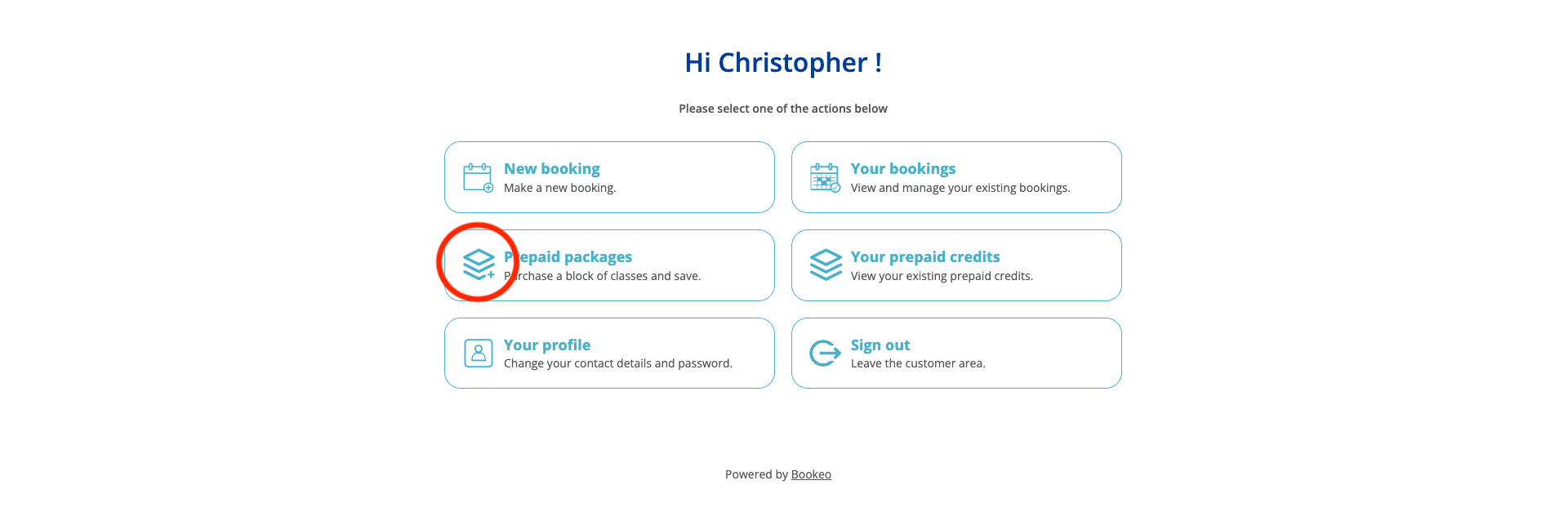
Open the Prepaid packages menu
Back in the
Customer Area,
look for the Prepaid packages section. Click it.
OR, if you are on the
Class Schedule Booking Page, look for the Prepaid icon in the Launch bar at the top (usually shown as a ticket or bundle). Click it.
Select the 8-class package
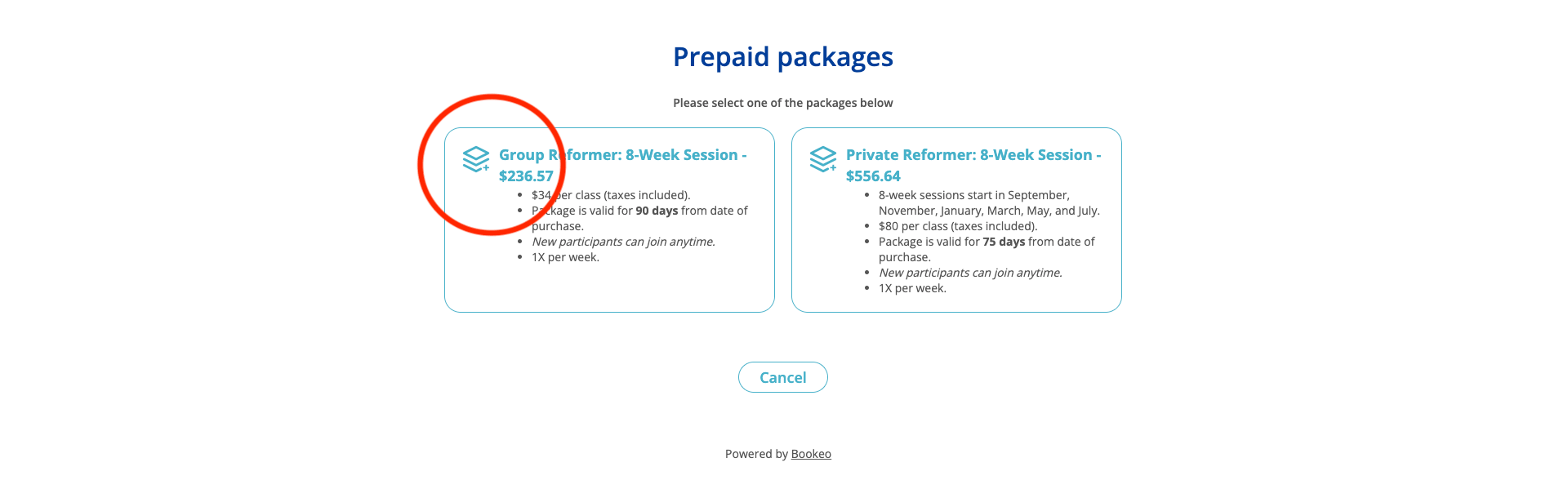
You'll see a list of available packages. Choose the 8-Class Reformer Package (or the variant that fits your fall plan). Take a moment to review:
- Credits included: one credit equals one group reformer class
- Which classes are covered by the package
- Validity period: how long you have to use your credits
- Price and applicable taxes
Complete your purchase
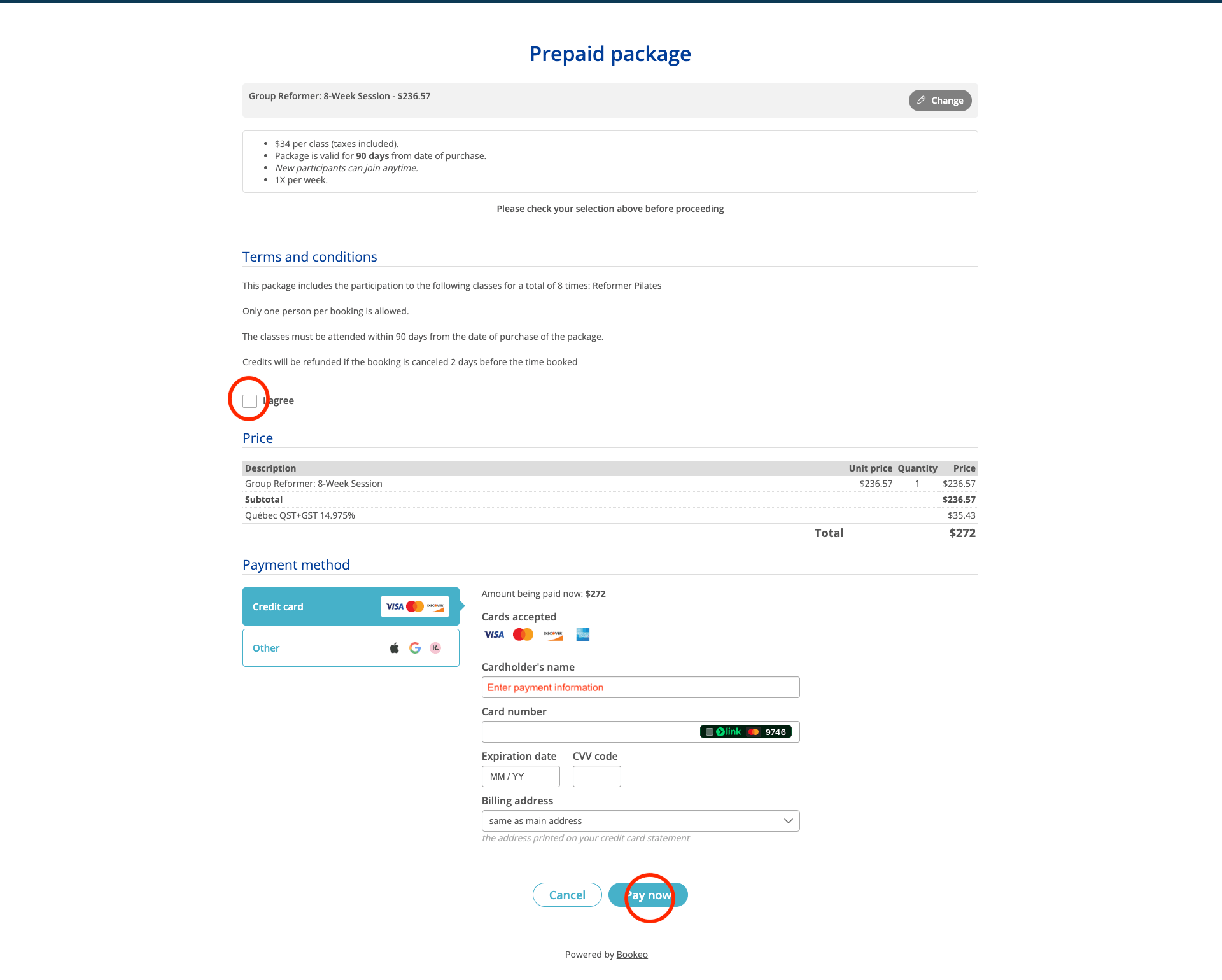
Click "I Agree" to accept the Terms & Conditions. Enter your credit card information and Click
Pay
now
on our secure payment page. Enter your card details, review your order summary, and confirm. A receipt will arrive by email within a few minutes.
YOUR CREDITS ARE LIVE
Your 8 credits are now sitting in your account, ready to use. You can confirm this at any time by opening Your account from the top of the booking page and looking at your Prepaid credits tab.
05. Book your fall classes
Now the enjoyable part. Because your credits are already loaded, booking each class is quick and doesn't require a payment step.
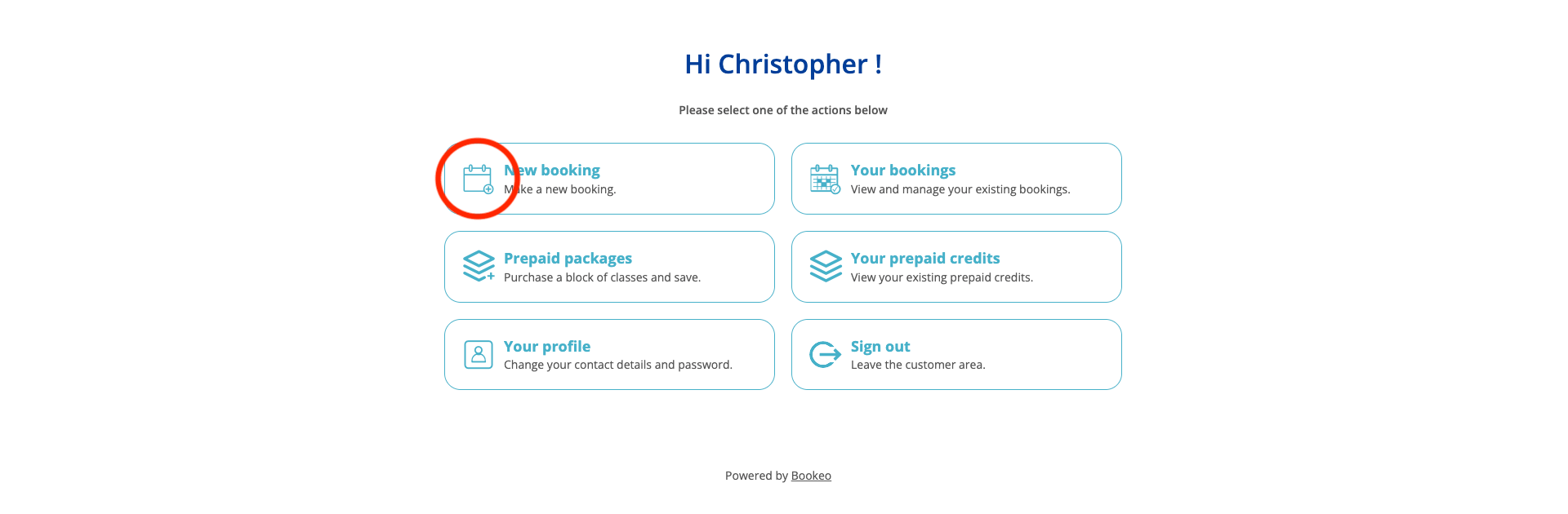
Return to the customer area or go to the class schedule / booking page
From the Customer Area, click New booking.
OR, go to
pilateswestisland.com/class-schedule (or click
Book a Class from the top nav). Make sure you're signed in. In the Launch bar, you should see
Your account where
Sign in used to be. That's how you know you're logged in.
Browse the fall schedule
Use the calendar or list view to see all upcoming classes. You can filter by:
- Class type (group reformer, Body Alignment Therapy, and other services)
- Day of the week
- Instructor
- Time of day
Take a moment to plan your fall practice. We recommend booking your preferred time slot for the full session at once (see step 4), since our classes cap at five participants and popular slots fill quickly.
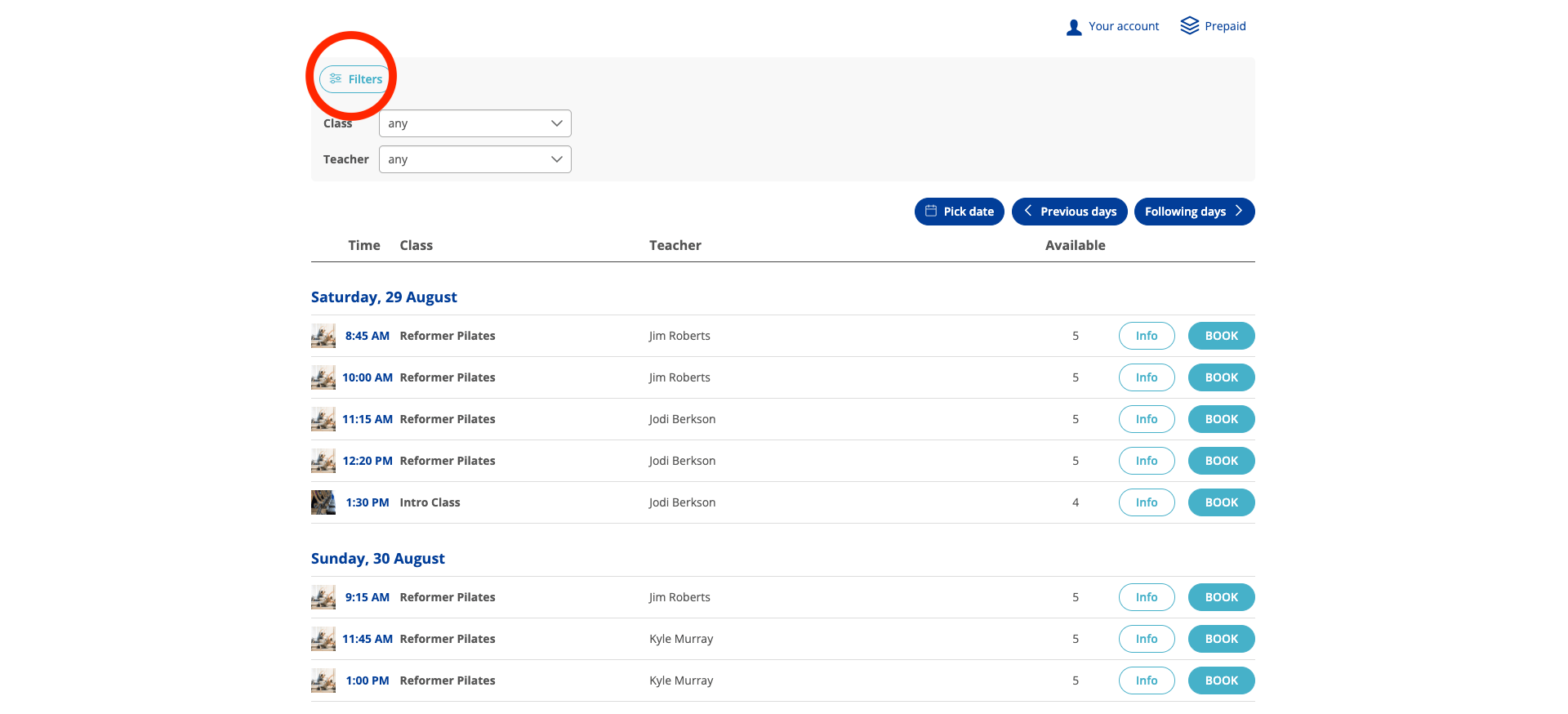
Select a class
Click the class you'd like to attend. A booking window will open showing the date, time, instructor, and remaining spots. Confirm the details are right, then click
Book now.

Select repeating visits
Because you have prepaid credits, no payment is required.
One credit will be automatically deducted from your package. Confirm any studio policies or waivers if prompted (you'll typically only need to do this once).
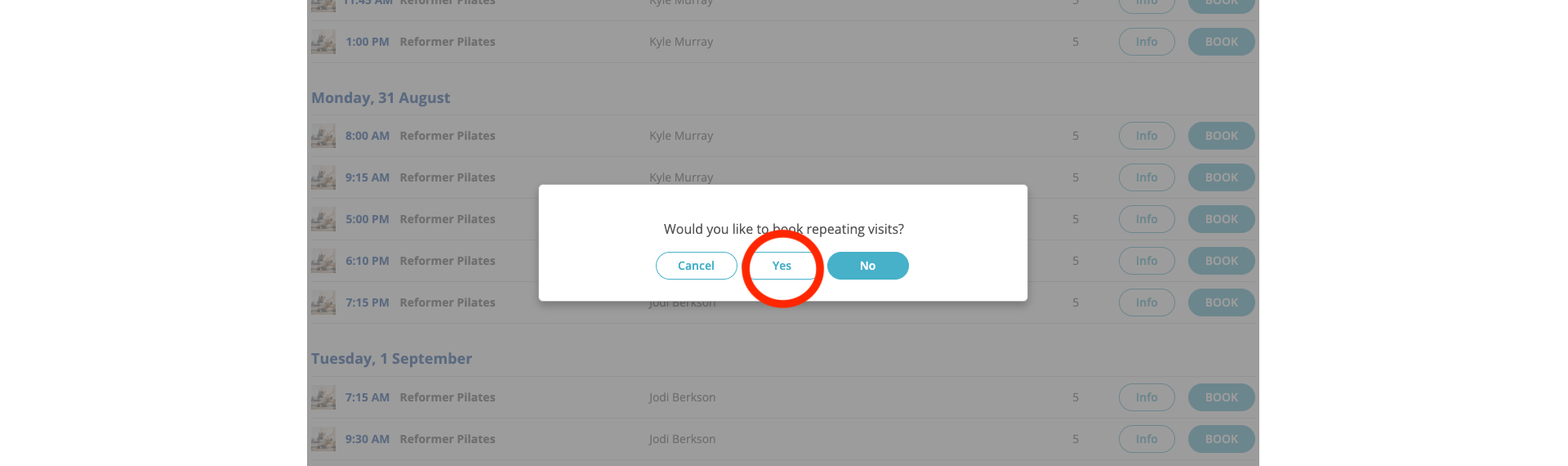
Repeat for each class you'd like to attend
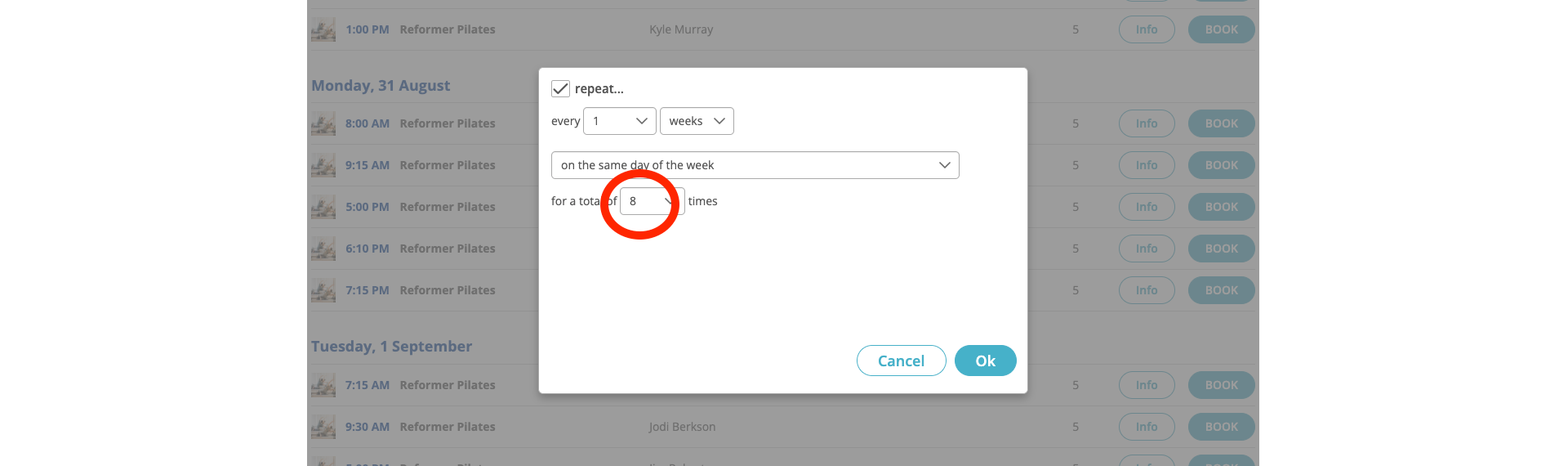
Select repeat, every week, on the same day of the week, for a total of
8
weeks to reserve your spot at the same time slot each week. If you are uncertain about reserving the same weekly time slot, go back to step 4 and select
No, then follow next step.
OR, you can return to the schedule and repeat the process for each session you want during the fall term. You'll see your remaining credit count update as you go. A confirmation email will land in your inbox for each booking, and you'll receive reminder emails before each class.
06. Manage your account
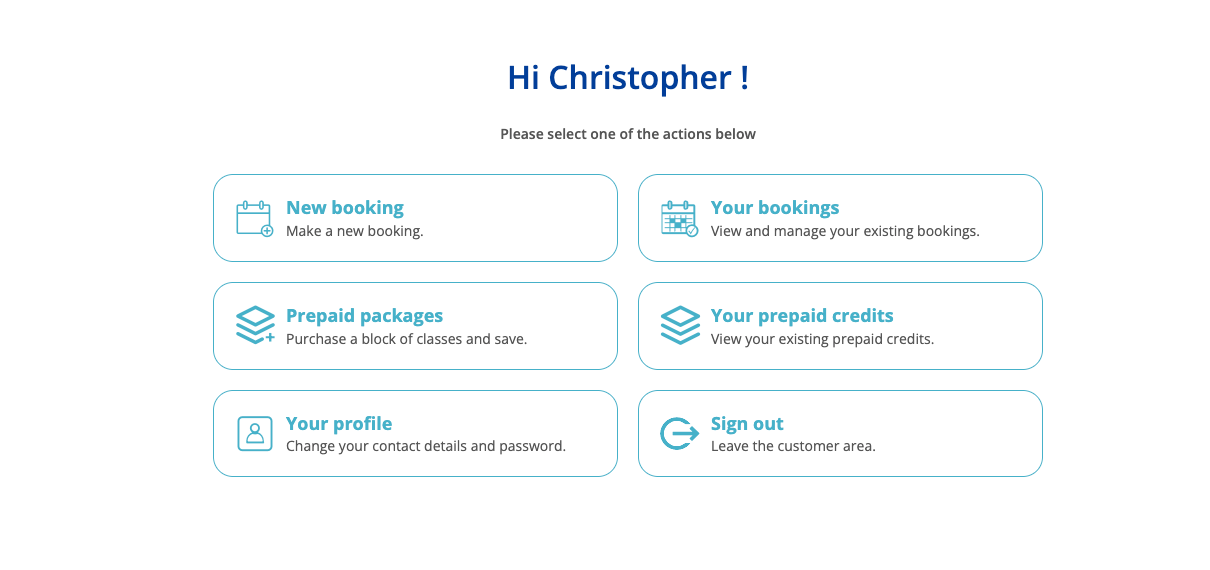
You can manage everything from your
customer area, accessible any time by clicking
Your account at the top of the class schedule / booking page. This is your personal dashboard with us.
From your customer area you can:
- View upcoming bookings and see your fall schedule at a glance
- Cancel or reschedule a class within our cancellation windows (see our Terms and Conditions)
- Track your remaining credits and package expiry date
- Purchase additional packages or gift cards
- Update your contact details or password
07. A few things to know
Cancellations
If you can no longer attend a class, please cancel at least 12 hours in advance so the spot can be offered to another client. Cancellations inside that window forfeit the credit. Full details are in our Terms and Conditions.
Waitlists
If a class is full, you'll usually see a Join waitlist option. Add yourself, and the system will notify you by email if a spot opens up.
Confirmations and reminders
You'll receive an email confirmation for each booking and a reminder before each class. If you're not receiving them, check your spam folder first, then your notification preferences in your customer area.
Booking on your phone
Our booking page works well on mobile. If you find yourself booking classes weekly, we recommend adding pilateswestisland.com/class-schedule to your phone's home screen for one-tap access.
08.
If you get stuck
Forgot your password
Use the
Forgot password? link on the sign-in page. A reset link will be emailed to you within a minute.
The system doesn't recognize your email
If you booked with us before and the platform doesn't find your profile, please
contact us. We may need to link your existing history to your new account.
Your credits aren't showing up at checkout
Make sure you're
signed in before selecting a class. Credits only apply to bookings made from an account that owns them, and only to bookings for one participant at a time.
The system doesn't recognize your email
We're happy to walk you through the whole flow at the studio. Drop in during our open hours in Valois Village, or reach out through our
contact page and we'll set aside a moment to help you register.
09. Common questions & registration FAQ
A quick set of answers to the questions we hear most often about booking, accounts, and packages. For general questions about Pilates, our classes, and what to expect at the studio, our
full FAQ has you covered.
I've booked with Pilates West Island before. Do I still need to create a new account?
Yes, please set up a new account on our updated platform. Once you're signed up, we can link your booking history and any active credits from the previous system. Just reach out and we'll take care of it on our end. You won't lose your history.
How long do I have to use my 8 credits?
Your 8 credits are valid for the length of the fall session (the exact expiry date is shown on the package at checkout and inside your customer area). We recommend booking your classes early in the session to make full use of your package. If life gets in the way, please get in touch before your credits expire and we'll see what we can do.
Can I share my package with a friend or partner?
Prepaid packages are personal to you and cannot be shared or transferred to another person. If you'd like to introduce someone to the studio, we offer gift cards that they can redeem toward any of our services. Contact us to purchase one.
What if I can't make a class I've booked?
If you're a package holder, please cancel through your customer area at least 24 hours before class. Your credit will be returned to your account and can be used for another session. Cancellations inside the 24-hour window are not eligible for make-ups.
Drop-in bookings and intro classes are not eligible for make-ups or refunds, since spots are held in advance.
The class I want is full. What now?
Add yourself to the waitlist right from the class page. If someone cancels, you'll receive an email letting you know a spot has opened up. Waitlist notifications go out on a first-added, first-notified basis, so joining as early as you can helps.
Can I book multiple classes at once for the full session?
Yes, and we recommend it. Because our classes cap at five participants, booking your preferred day and time for the full fall session in one sitting helps you lock in the schedule that works for your week. Your credits are deducted as you book each class, and you'll see your remaining balance update in real time inside your customer area.
Can I book classes from my phone?
See scheduleYes. Our booking page is designed to work well on mobile. If you find yourself checking the schedule or booking weekly, we recommend adding pilateswestisland.com/class-schedule to your phone's home screen for one-tap access.
What payment methods do you accept?
We accept major credit, Apple & Google Pay through our secure online checkout. Your receipt is emailed automatically within a few minutes of your purchase.
Do you provide recipts for insurance
Contact usYes. A standard receipt is emailed after every purchase. For private sessions that may be eligible for reimbursement through your extended health plan. If you know your plan requires specific information (a provider name, licence number, or service code), include those details in your request so we can prepare it correctly.
I forgot my password or I'm having trouble signing-in
Use the forgot password? link on the sign-in page. A reset link will land in your inbox within a minute or two (check your spam folder if it doesn't appear). If the system tells you it doesn't recognize your email but you've booked with us before, please get in touch. We may need to link your existing profile to the new platform manually.
LOOKING FOR SOMETHING ELSE?
Questions about what to wear, first-timer nerves, class formats, or how often to practise? Our full FAQ has more.
#MOVEWITHINTENTION
Begin Your Reformer Pilates Journey Today
Join Pilates West Island and experience mindful movement that supports your body, balance, and well-being.
Recent Posts